How to Create WhatsApp Polls? Best Guide 2025

Updated: Jul 15, 2025

Table of Content
Introduction
WhatsApp Polls are a feature that allows users to quickly create and share polls inside WhatsApp chats, helping them gather feedback and opinions from group members for fast decision making and interactive engagement. Whether in personal or group chats, the WhatsApp poll function makes it simple to conduct a poll in WhatsApp, create a vote on WhatsApp, or set up a poll on WhatsApp Android or iPhone.
Many users wonder how to put poll in WhatsApp or even explore how to do a doodle poll on WhatsApp, but creating a poll directly within WhatsApp keeps conversations organized and ensures everyone’s voice is heard. This guide is brought to you by WA CRM.
What are WhatsApp polls?
WhatsApp Polls are a feature built directly into the app that lets you ask a question and provide multiple choices for people to vote on. Instead of sifting through countless messages, the WhatsApp poll function shows all responses in one neat place. People often ask, can you create a poll in WhatsApp, and the answer is absolutely yes. Whether you’re using WhatsApp poll multiple options or anonymous voting, creating a poll on WhatsApp helps keep your group chats organized and ensures everyone’s voice is heard.
How to create WhatsApp polls?
Creating WhatsApp Polls is quick and simple, regardless of the device you’re using. Whether you’re trying to figure out how to create a vote on WhatsApp, how to put poll in WhatsApp, or how to set up poll on WhatsApp Web, the steps are designed to be user-friendly. Many people search how to conduct poll in WhatsApp, and this section explains everything you need to know.
How to Create a Poll in WhatsApp Group on Android?

Learning how to create WhatsApp Polls in a group chat on Android is perfect for getting fast feedback. Whether you want to create poll on WhatsApp Android, conduct a survey, or keep conversations organized, here’s how it’s done:
Step 1: Open WhatsApp and Navigate to the Group Chat
Launch WhatsApp and enter the group where you want to create WhatsApp Polls for your discussion.
Step 2: Tap the Paper Clip Icon
Tap the paper clip icon at the bottom right of the screen to access tools like how to set up poll on WhatsApp.
Step 3: Choose the Poll Option
From the options that appear, tap Poll to begin creating a poll on WhatsApp.
Step 4: Enter Your Question and Possible Answers
Type your WhatsApp poll question and fill in your answer choices. WhatsApp polls support up to 12 options, perfect for WhatsApp poll multiple options.
Step 5: Click Send to Post the Poll
Tap Send to share your poll in the group chat. This is how to make voting in WhatsApp easy and collect poll votes free from your group.
Understanding how to create a poll in WhatsApp group on Android ensures you can quickly gather opinions and keep discussions focused.
How to Create a WhatsApp Poll on iPhone?
If you’re an iPhone user, figuring out how to create WhatsApp Polls is equally simple. Many people search how to create a vote on WhatsApp, how to put poll in WhatsApp, or how to conduct poll in WhatsApp on iOS. Here’s your guide:
Step 1: Open WhatsApp and Go to the Chat
Open WhatsApp and go to the chat or group where you want to create WhatsApp Polls.
Step 2: Tap the Plus Icon
Tap the plus (+) icon next to the message input field. This is your gateway to features like creating a poll on WhatsApp.
Step 3: Select the Poll Option
From the menu, choose Poll to start setting up poll on WhatsApp.
Step 4: Type Your Question and Answer Choices
Enter your WhatsApp poll question and add your answer options. Creating WhatsApp poll multiple options makes your poll versatile and engaging.
Step 5: Tap Send to Post the Poll
Tap Send to put poll in WhatsApp and let participants start voting. This is essential knowledge for how to conduct poll in WhatsApp and how to make voting in WhatsApp simple.
Learning how to create WhatsApp Polls on an iPhone ensures that you can manage group decisions with ease and clarity.
How to Create a WhatsApp Poll on Web/Desktop?
Many users want to know how to create WhatsApp Polls while working from their computer. Whether for business or personal chats, the Web and Desktop versions make it easy. People also wonder how to do a doodle poll on WhatsApp, but thanks to the WhatsApp poll function. Here’s how to create a poll in WhatsApp Web or Desktop:

Step 1: Open WhatsApp Web or Desktop
Visit WhatsApp Web or launch the WhatsApp Desktop app to start creating WhatsApp Polls from your computer.

Step 2: Go to the Chat or Group
Navigate to the chat or group where you want to set up poll on WhatsApp.
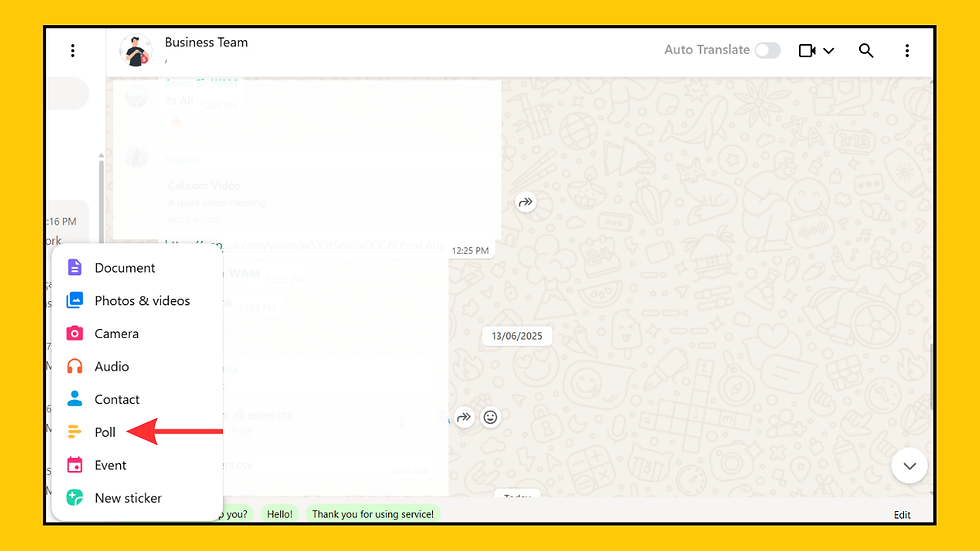
Step 3: Click the Attach Icon and Choose Poll
Click the paperclip or plus icon, then select the Poll option to begin creating WhatsApp Polls.

Step 4: Type Your Question, Add Options, and Send Your Poll
Enter your WhatsApp poll question, add up to 12 answer choices for WhatsApp poll multiple options, and click Send to create a poll on WhatsApp We
b or Desktop and conduct poll in WhatsApp for group feedback.
Learning how to create WhatsApp Polls on Web or Desktop allows you to conduct polls without needing to switch to your phone, making it perfect for productivity and group management.
How Users Can Vote in WhatsApp Polls?

Once you’ve created WhatsApp Polls, participants need to know how to make voting in WhatsApp seamless. Many people look up how to start poll in WhatsApp and how to interact with polls. Here’s how voting works:
Step 1: Open the Chat and Tap the Poll
Find the chat with your WhatsApp Polls message and tap on the poll to view the WhatsApp poll question and all answer choices, including WhatsApp poll multiple options if they’re available.
Step 2: Select Your Option and Submit Your Vote
Tap your chosen option to make voting in WhatsApp easy. Your vote in WhatsApp Polls is registered instantly, showing real-time results and helping you conduct poll in WhatsApp smoothly.
Voting in WhatsApp Polls makes it simple for everyone to share their opinion without cluttering the chat with individual messages.
What are WhatsApp polls useful for?
WhatsApp Polls are highly versatile and useful in both personal and business scenarios. People often ask what are WhatsApp Polls useful for or how to conduct poll in WhatsApp to meet different needs. Here are common ways to use them:
1. Event Planning
Use WhatsApp Polls to create a vote on WhatsApp and conduct poll in WhatsApp for choosing event dates or venues.
2. Group Decisions
Learn how to set up poll on WhatsApp and put poll in WhatsApp to quickly decide on group actions or leadership roles.
3. Feedback Collection
Create WhatsApp poll multiple options and conduct poll in WhatsApp to gather opinions on services and products.
4. Quick Surveys
Run fun polls using the WhatsApp poll function and explore how to do a doodle poll on WhatsApp for trending topics.
5. Business Insights
Create a poll on WhatsApp Android or iPhone and use WhatsApp poll votes free to collect business feedback efficiently.
Using WhatsApp Polls helps you streamline decisions and keep discussions focused, no matter the context.
Benefits of WhatsApp polls
There are many reasons why people ask can you do polls on WhatsApp. The benefits of WhatsApp Polls make them a must-use feature for managing conversations:
1. Time Saver
WhatsApp Polls help create a vote on WhatsApp and conduct poll in WhatsApp without endless message threads slowing decisions.
2. Keeps Chats Tidy
Using the WhatsApp poll function and knowing how to put poll in WhatsApp keeps chats organized and answers visible in one place.
3. Encourages Participation
Creating WhatsApp poll multiple options and learning how to set up poll on WhatsApp makes everyone feel included in group decisions.
4. Simple Interface
The simple interface helps users create a poll on WhatsApp Android or iPhone and manage polls smoothly with WhatsApp poll votes free.
5. Privacy Options
WhatsApp anonymous polls and features like how to do a doodle poll on WhatsApp ensure privacy while collecting honest feedback.
WhatsApp polls best practices
To get the best results from WhatsApp Polls, follow these essential tips. Many people looking for how to add poll on WhatsApp or how to conduct poll in WhatsApp can benefit from these best practices:
Keep Questions Clear
Use simple, direct language for your WhatsApp poll question so everyone understands it.
Limit Options
Even though WhatsApp Polls allow multiple options, too many choices can overwhelm voters.
Engage Participants
Encourage everyone to participate once you create a poll on WhatsApp to ensure diverse feedback.
Analyze Results
Review poll results to make informed decisions and follow up with action if necessary.
These tips make creating and managing WhatsApp Polls more effective and ensure you get meaningful feedback.
Bonus Tip: Boost Your WhatsApp Marketing with a WhatsApp CRM
Using a WhatsApp CRM tool can make your business communication smoother and more organized. Whether you’re handling customer chats, sending marketing messages, or working with templates, a WhatsApp CRM helps you save time and improve results.
Step 1: Install a WhatsApp CRM Tool
Choose and install a reliable WA CRM extension or software from a trusted provider to enhance how you handle chats, templates, and campaigns.
Step 2: Open WhatsApp Web
Launch your WhatsApp CRM tool alongside WhatsApp Web so you can easily manage conversations, templates, and customer interactions in one place.
Step 3: Organize Your Chats
Use features like custom tabs or labels to sort your chats based on topics, customers, or marketing campaigns for better workflow and focus.
Step 4: Track Customer Interactions
Add notes to chats to record important details about customer interactions, conversations, or which messages you’ve sent.
Step 5: Schedule Messages and Reminders
Set reminders or schedule messages to ensure you send timely follow-ups, marketing campaigns, or important updates to your contacts.
Conclusion
WhatsApp Polls are a powerful way to simplify decision making, improve communication, and keep your chats organized. Whether you’re planning an event, running a business survey, or just settling a fun debate, knowing how to create WhatsApp Polls is a skill every user should have. From how to make a poll on WhatsApp Android, to how to set up a poll on
WhatsApp iPhone and even on Web or Desktop, the process is fast and user friendly. With additional features like WhatsApp poll multiple options and anonymous polls, there’s never been a better time to start using this helpful feature.
FAQ: All about WhatsApp Polls
What are WhatsApp polls?
WhatsApp Polls are a handy feature in WhatsApp that lets users create and share polls directly in personal or group chats. With WhatsApp Polls, you can easily gather feedback and opinions by crafting a specific WhatsApp poll question, helping groups make quick decisions and stay organized. Whether you want to create a poll on WhatsApp Android or iPhone, set up a poll on WhatsApp Web, or explore how to conduct poll in WhatsApp, this feature simplifies interactive engagement and makes managing group conversations much easier.
How can I create a poll on WhatsApp?
Creating WhatsApp Polls is easy and helps you engage your contacts with interactive questions. To create a poll on WhatsApp, open the chat where you want to start WhatsApp Polls, tap the Attach icon (the paperclip), and choose the Poll option. Type your WhatsApp poll question, which can be up to 255 characters, and add up to 12 choices with each option up to 100 characters. You can also decide whether to allow WhatsApp poll multiple options for voting. Once you’ve finished setting up your poll on WhatsApp, simply tap Send to share it in the chat and start collecting WhatsApp poll votes free from your group or individual chats.
How do I create a poll in a WhatsApp group on Android?
Creating WhatsApp Polls in a WhatsApp group on Android is simple and helps manage group decisions effectively. To create WhatsApp Polls on your Android device, open the group chat where you want to start the poll, tap the attach icon (the paperclip), and select the Poll option. Type your WhatsApp poll question and add your poll choices, which can include WhatsApp poll multiple options if needed. Once you’ve finished setting up your poll on WhatsApp, tap Send to share it with the group and gather feedback or create a vote on WhatsApp easily.
How do I create a poll on WhatsApp using an iPhone?
Creating WhatsApp Polls on an iPhone makes it easy to engage your contacts and gather opinions directly in your chats. To create WhatsApp Polls on iPhone, open the chat where you want to set up your poll, tap the plus (+) icon, and select the Poll option. Enter your WhatsApp poll question along with the answer choices, and then tap Send. This feature allows you to create a vote on WhatsApp quickly, whether you want to conduct poll in WhatsApp for personal conversations or group discussions, and helps keep your chats organized with the WhatsApp poll function.
How do I create a poll on WhatsApp Web or Desktop?
Creating WhatsApp Polls on WhatsApp Web or Desktop is simple. Open the chat where you want WhatsApp Polls, click the paperclip icon, and choose Poll. Type your WhatsApp poll question, add your answer options, and send your poll. This makes it easy to create a vote on WhatsApp and conduct poll in WhatsApp from your computer.
How can users vote in WhatsApp polls?
Voting in WhatsApp Polls is simple. Tap or click your choice in the WhatsApp Polls shared in the chat. If the poll allows WhatsApp poll multiple options, you can select more than one. To change your vote, just tap the option again. This is how to make voting in WhatsApp easy and keep your chats organized.
What are the benefits of using WhatsApp polls?
WhatsApp Polls offer great benefits like quick decision-making, high engagement, and easy sharing in group chats. With WhatsApp Polls, it’s simple to create a vote on WhatsApp and collect real-time feedback. They help conduct poll in WhatsApp smoothly and keep group discussions organized using the WhatsApp poll function.
What are best practices for creating WhatsApp polls?
For effective WhatsApp Polls, keep questions clear and short, and limit choices to avoid confusion. Using WhatsApp Polls helps you create a vote on WhatsApp and engage participants without overwhelming them. Always analyze results to improve how you conduct poll in WhatsApp and make future polls even better.


Comments