Top 15 WhatsApp Tools for Businesses in 2025


Table of Content
Introduction
Unlock the full potential of your business communication with the right WhatsApp tools that go beyond just messaging. Whether you're searching for a powerful WA tool, a smart WhatsApp manager, or an all-in-one WhatsApp business tool, the market is full of innovative solutions. From basic tools for WhatsApp messaging to full-fledged WhatsApp management and WhatsApp automation tools, every WhatsApp tool serves a unique purpose. This guide explores the top-rated WA tools, including options listed on WhatsApp tool net profiles, to help you choose the right solution for your business.
This guide is brought to you by WA CRM extension.
What are WhatsApp Tools?
WhatsApp tools are third-party applications, browser extensions, or platforms designed to enhance how businesses use WhatsApp for communication, automation, and customer engagement. These tools offer features beyond the native WhatsApp interface, helping businesses streamline operations and improve efficiency.
Automate Repetitive Tasks: WhatsApp automation tools like WA tools and WATools allow businesses to schedule messages, set up auto-replies, and run campaigns without manual effort.
Organize and Manage Chats Effectively: With WhatsApp manager and WhatsApp management tools, users can label conversations, assign chats to team members, and track customer interactions systematically.
Enable Bulk Messaging and Broadcasting: WhatsApp business tools and tools for WhatsApp make it easy to send personalized bulk messages without saving each contact manually.
Support CRM and Integration: Platforms like WhatsAppTools.net and WhatsApp tool net provide CRM features, making it easier to manage leads, follow-ups, and customer databases within WhatsApp.
Improve Team Collaboration: Multi-agent features in some WA tool extensions let multiple team members manage a single WhatsApp number, ensuring faster response times and better customer support.
Benefits of WhatsApp Tools
WhatsApp tools offer a wide range of advantages for businesses looking to streamline communication, automate workflows, and scale their customer engagement efforts. These tools go beyond the basic features of WhatsApp and help businesses operate more efficiently.
Time-Saving Automation: WhatsApp tools automate repetitive tasks like follow-ups, welcome messages, and campaign scheduling. This reduces manual work and increases overall productivity.
Improved Customer Engagement: Features like instant replies, chat templates, and personalized broadcasting help businesses connect with customers in a more meaningful and timely way.
Better Organization and Tracking: WhatsApp management tools provide features like tagging, labeling, and conversation categorization, making it easier to track leads and ongoing chats.
Higher Conversion Rates: With WhatsApp CRM tools and WA tool integrations, businesses can respond faster, follow up consistently, and convert leads more effectively.
Scalability and Team Collaboration: Many WhatsApp tools allow multiple team members to manage chats from a shared dashboard, making it easier to scale communication as the business grows.
Top WhatsApp Tools
WA-CRM

From "Hello" to "Sold" on WhatsApp, WA-CRM is a powerful Chrome extension designed to turn your regular WhatsApp Web into a full-featured CRM workspace. Whether you're a small business owner, freelancer, sales professional, or support agent, WA CRM brings smart chat management, note-taking, and follow-up tracking into one streamlined interface. With WhatsApp CRM, businesses can handle customer conversations, schedule reminders, and manage leads, all without leaving WhatsApp.
Top Features of WA-CRM
Smart Chat Tabs – Categorize chats using custom tabs like Unread, Closed, Follow-Up, and Snoozed.
Chat Notes – Add notes directly to conversations for tracking lead info, customer queries, or tasks.
Reminders & Snooze – Set chat-specific reminders or snooze less important messages for later.
Chat Without Saving Numbers – Initiate conversations with non-contacts instantly, perfect for outreach.
Inbox Productivity Tools – Improve workflow with starred chats, sorted tabs, and archived or closed threads.
Pros of WA-CRM
Fully Local & Secure – No data is sent to external servers; everything stays in your browser.
Designed for WhatsApp Web – Seamlessly blends into your existing WhatsApp interface.
Perfect for Teams & Individuals – Suitable for agencies, freelancers, and sales/support teams alike.
No Learning Curve – User-friendly design makes onboarding quick and easy.
24/7 Customer Support – Assistance available via WhatsApp, Google Meet, or email.
Cons of WA-CRM
Chrome-only for now, ensuring top performance on the most-used browser.
No cloud sync, keeping all your data 100% private and secure.
WATI

WATI is a WhatsApp Business API platform designed for customer support and sales teams. It offers a shared team inbox, chatbot automation, and CRM integrations to help businesses manage conversations at scale. Ideal for mid-sized to large businesses, WATI enables real-time collaboration, customer segmentation, and automated messaging.
Top Features of WATI
Shared multi-agent WhatsApp inbox
No-code chatbot builder for automation
CRM and third-party integrations
Bulk broadcast messaging
Real-time analytics and conversation tracking
Pros of WATI
Built on the official WhatsApp Business API for stability and compliance
Easy-to-use chatbot builder with drag-and-drop interface
Supports multi-agent collaboration for team-based customer handling
Cons of WATI
Requires WhatsApp Business API approval, which can delay onboarding
Monthly pricing is expensive for small businesses and startups
Not suitable for individuals or businesses without a registered company
Premium Sender

The Ultimate WhatsApp Bulk Message Sender - Premium Sender is a powerful and intuitive Chrome extension that allows users to send thousands of WhatsApp messages with just one click. Perfect for marketers, educators, event managers, and support teams, it combines secure bulk messaging with smart anti-ban features, personalization tools, and attachment support. With over 50,000 active users, Premium Sender is a trusted solution for professional WhatsApp outreach.
Top Features of Premium Sender
Bulk messaging through Excel or CSV uploads
Anti-ban protection with customizable delay intervals
Send up to 7 attachments per message
Personalized messages using dynamic variables
Built-in AI rewriter to adjust tone and content instantly
Pros of Premium Sender
Fast and efficient bulk messaging with high success rates
Simple, user-friendly interface suitable for all user levels
Smart delay and human-like message delivery to avoid bans
Advanced personalization for better engagement and response
Backed by 5+ years of Chrome extension development experience
Cons of Premium Sender
Available only on Chrome desktop to ensure full functionality and stability
Does not require WhatsApp Business API, making setup easier but limiting official API features
Interakt

Interakt is a WhatsApp Business platform built on the official WhatsApp Business API, designed to help businesses manage customer conversations, automate responses, and drive engagement at scale. It offers features like shared inboxes, customer segmentation, broadcast messaging, and sales tracking. Interakt is widely used by e-commerce stores, D2C brands, and growing startups to streamline support and marketing workflows.
Top Features of Interakt
Shared team inbox for managing multiple customer chats in one place
Official WhatsApp Business API integration for reliable communication
WhatsApp broadcasts for sending promotional messages to large audiences
Contact management and segmentation based on user behavior
E-commerce integration with platforms like Shopify and WooCommerce
Pros of Interakt
Built on the official WhatsApp Business API, ensuring high delivery and compliance
Offers useful automation tools like order notifications and abandoned cart alerts
Seamless integration with popular e-commerce platforms for real-time engagement
Cons of Interakt
Requires WhatsApp Business API approval, which may delay onboarding
Not suitable for individuals or small teams without a registered business
Limited flexibility in UI customization and branding options
WA Contact Extractor & Group Link Finder
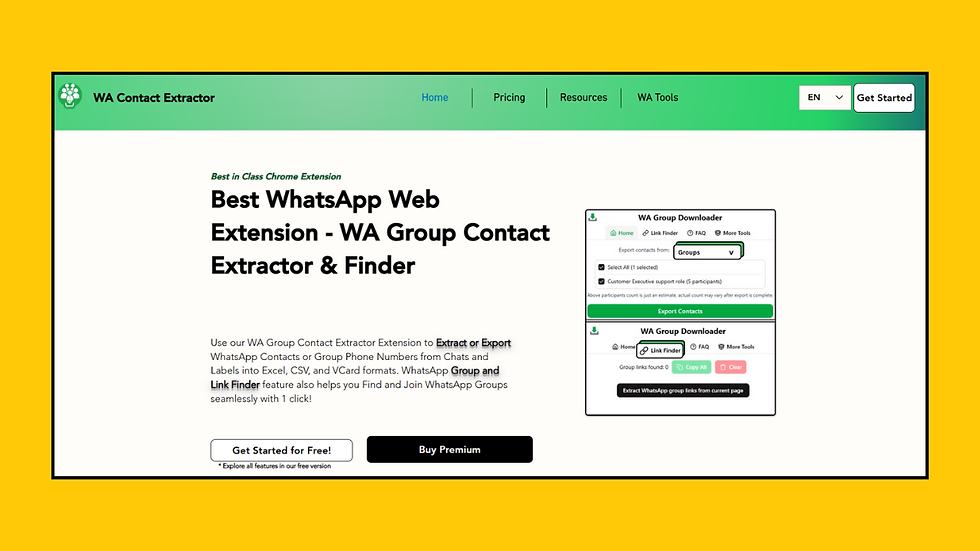
WA Contact Extractor is a best-in-class Chrome extension designed to help users Extract WhatsApp Group Contacts and discover active WhatsApp groups effortlessly. Whether you want to launch a marketing campaign, build a learning community, or grow your WhatsApp groups, this tool is your all-in-one solution. With one click, you can export group contacts into Excel, CSV, or VCard formats or find and join WhatsApp groups directly from any webpage.
Top Features of WA Contact Extractor
One-Click Contact Export: Export WhatsApp group contacts instantly into Excel, CSV, or VCard formats directly from WhatsApp Web.
WhatsApp Group Link Finder: Automatically extract and copy WhatsApp group invite links from any blog or webpage.
Join or Copy Multiple Groups: Easily join multiple groups at once or copy their invite links in bulk with one click.
Submit Your WhatsApp Groups: List your own groups online to attract members and grow your community faster.
Smart Filtering by Source: Choose to extract from chats, labels, or specific groups to keep your campaigns targeted and organized.
Pros of WA Contact Extractor
Saves hours of manual work by automating contact and link collection
Perfect for marketers, educators, and community managers
Works directly on WhatsApp Web with a simple and intuitive interface
Lets users grow their own groups by submitting group links for public listing
High compatibility and flexible download formats for contacts
Cons of WA Contact Extractor
Currently available only on Chrome desktop for optimal stability and performance
Group link extraction is limited to publicly visible links on web pages
Gallabox

Gallabox is a no-code WhatsApp automation platform designed to help businesses enhance customer communication, streamline lead generation, and automate sales workflows using the official WhatsApp Business API. With its shared team inbox, chatbot builder, and seamless integrations, Gallabox is ideal for support teams, e-commerce brands, and service-based businesses looking to manage conversations at scale.
Top Features of Gallabox
Manage customer conversations collaboratively with your team in a unified inbox.
Create custom workflows and automate replies without any coding.
Easily connect with popular CRMs like Zoho, HubSpot, and more for end-to-end tracking.
Send WhatsApp broadcasts to pre-approved customer lists using API-approved messaging.
Organize and label contacts based on activity, interest, or stage in the sales funnel.
Pros of Gallabox
No-code chatbot builder makes automation easy for non-technical teams
Provides a centralized platform for support, marketing, and sales
Supports team collaboration with multi-agent WhatsApp access
Cons of Gallabox
Requires WhatsApp Business API approval, which may take time
Pricing is relatively high for early-stage or small businesses
Limited customization for UI and branding elements
WA Filter

Bulk WhatsApp Number Checker, Verifier & Lookup Tool
WA-Filter is a smart Chrome extension that helps you filter and verify WhatsApp numbers with precision. Whether you’re validating leads, cleaning CRM databases, or prepping broadcast lists, WhatsApp Number Filter ensures your WhatsApp campaigns reach only active users. Trusted by 5,000+ businesses, this tool is a must-have for marketers and customer support teams looking to maximize delivery and engagement.
Top Features of WA Filter
Bulk Number Verification: Instantly verify thousands of WhatsApp numbers using CSV upload or manual input.
WhatsApp Number Lookup Tool: Check if a specific number is active on WhatsApp before initiating contact.
Clean Contact Lists: Remove landlines and inactive users to improve messaging accuracy.
Safe Filtering Technology: Compliant with WhatsApp policies to reduce the risk of account flags or bans.
Instant Report Generation: Download results showing active and inactive numbers for better campaign targeting.
Pros of WA Filter
Saves time by filtering large lists in just a few clicks
Helps avoid message delivery errors and wasted outreach
Accurate results that improve marketing ROI and campaign targeting
Simple, user-friendly interface for both beginners and professionals
Built with safety and performance in mind to protect your WhatsApp account
Cons of WA Filter
Available only on Chrome desktop to ensure full functionality and performance
Does not verify non-WhatsApp numbers for alternate contact channels
WA Web Plus

WA Web Plus is a browser extension that enhances WhatsApp Web by adding CRM-like features, automation tools, and privacy controls. It's ideal for freelancers, professionals, and small business owners who want to improve productivity and organize chats directly within WhatsApp Web without needing API access.
Top Features of WA Web Plus
Add notes, labels, and follow-up reminders to individual chats
Blur names, messages, and profile pictures for added privacy
Auto-reply functionality for when you're unavailable
Message scheduling for future sends
Export chats and view basic message analytics
Pros of WA Web Plus
Easy to use and integrates directly with WhatsApp Web
Adds lightweight CRM features without complex setup
Offers useful privacy tools for screen sharing and work environments
Cons of WA Web Plus
Many advanced features are only available in the premium version
Not suitable for teams since it lacks multi-user collaboration
Some features may break when WhatsApp Web receives major updates
WhatsApp Translator Extension

Translate Messages Instantly on WhatsApp Web
WhatsApp Translator is a Chrome extension that allows you to translate incoming and outgoing WhatsApp messages in real time. Whether you're chatting with friends abroad or offering multilingual customer support, this WhatsApp Web Translator Tool helps break language barriers with just one click. With support for over 100 languages and automatic detection, it transforms WhatsApp Web into a truly global messaging platform.
Top Features of WhatsApp Translator
One-Click Message Translation: Instantly translate any message inside WhatsApp Web without copy-pasting.
Auto Language Detection: Detects the language of any message automatically for smooth, uninterrupted communication.
Reply in Same Language: Respond in the language your contact used with a single toggle.
Auto-Translate Chats While Typing: Write in your native language and let the extension automatically translate messages in real time.
Supports 100+ Languages: Communicate globally with translations across all major languages like Spanish, French, Hindi, Arabic, and more.
Pros of WhatsApp Translator
Enables real-time multilingual communication directly on WhatsApp Web
No need to switch tabs or use third-party translators
Offers 50 free message translations for new users
User-friendly setup and seamless integration into WhatsApp Web
Ideal for customer support, remote teams, and international chats
Cons of WhatsApp Translator
Currently works only on Chrome desktop to ensure real-time translation performance
Free version has a limit of 50 translations before upgrade is needed
AiSensy

AiSensy is a full-featured WhatsApp marketing and automation platform built on the official WhatsApp Business API. It allows businesses to run broadcast campaigns, automate customer conversations using chatbots, and manage chats at scale through a shared inbox. The platform is popular among e-commerce brands, agencies, and startups aiming to boost customer engagement through WhatsApp.
Top Features of AiSensy
Broadcast messaging to thousands of users using approved WhatsApp templates
Drag-and-drop chatbot builder for automating replies and lead qualification
Real-time analytics dashboard to monitor message delivery, open rates, and user behavior
Multi-agent team inbox for managing customer queries collaboratively
CRM and e-commerce integrations for streamlined campaign execution
Pros of AiSensy
Built on WhatsApp’s official API, ensuring security and high delivery success
Suitable for both marketing and support functions with automation capabilities
Offers integrations with platforms like Shopify, HubSpot, and WooCommerce
Cons of AiSensy
Requires WhatsApp Business API approval, which may delay setup
Template-based messaging can limit creative flexibility in conversations
Not cost-effective for individuals or small businesses with low messaging volume
SheetWA

SheetWA is a lightweight Chrome extension that allows users to send personalized WhatsApp messages directly from Google Sheets or Excel files. It's widely used by small businesses, educators, and marketers who want a quick, no-code way to send bulk messages without needing the WhatsApp Business API. With a simple UI and support for message variables, SheetWA offers a practical solution for outreach campaigns.
Top Features of SheetWA
Send WhatsApp messages directly from Google Sheets
Support for dynamic variables like name and number for personalization
Option to add media attachments like images and PDFs
Works without saving contacts or requiring API access
Simple Chrome extension setup with no technical skills needed
Pros of SheetWA
Easy to use for beginners with no API approval needed
Perfect for educators, freelancers, and small businesses
Allows sending personalized messages at scale directly from spreadsheets
Cons of SheetWA
Lacks advanced features like message scheduling or CRM integration
Not suitable for large-scale teams or enterprises
Limited support for automation or message analytics
Engati

Engati is an AI-powered chatbot and customer engagement platform that enables businesses to automate conversations across multiple channels, including WhatsApp. It provides tools for building no-code chatbots, managing customer queries, and integrating workflows across WhatsApp, Messenger, Instagram, and more. Engati is used by businesses looking to unify customer support and automate lead handling at scale.
Top Features of Engati
No-code chatbot builder with drag-and-drop interface
Omnichannel support including WhatsApp, Facebook, Instagram, and Telegram
WhatsApp automation using the official WhatsApp Business API
Live chat dashboard to monitor, take over, or assign conversations
Integration with platforms like Shopify, Salesforce, and Google Sheets
Pros of Engati
Offers multi-platform automation beyond just WhatsApp
Ideal for customer support teams looking to combine live chat and bots
Easy-to-use visual builder makes chatbot setup quick and accessible
Cons of Engati
WhatsApp features require API approval and may involve additional costs
Interface can be overwhelming for first-time users with basic needs
Not specialized solely for WhatsApp, which may reduce focus for WhatsApp-centric use cases
Cooby

Cooby is a Chrome extension that enhances WhatsApp Web with CRM integration and inbox organization features. It allows users to sync messages to platforms like HubSpot and Salesforce, manage contacts, and structure chats for better workflow management. Cooby is especially useful for teams that rely on WhatsApp for sales or customer support.
Top Features of Cooby
Sync WhatsApp conversations directly with CRMs like HubSpot and Salesforce
Organize chats using tabs such as Unread, Snoozed, and custom filters
View and update CRM data from within the WhatsApp Web interface
Send bulk messages to unsaved numbers without API setup
Create tasks, deals, and tickets based on WhatsApp messages
Pros of Cooby
Strong integration with leading CRMs for streamlined communication
Easy inbox management with customizable tabs
Secure local storage with no external data syncing
Cons of Cooby
Requires a CRM subscription to access full features
Not suitable for users without CRM workflows
Advanced options like team dashboards are only available in paid plans
ControlHippo

ControlHippo is a WhatsApp shared inbox platform that helps businesses manage customer conversations more effectively. Built primarily for support and sales teams, it allows multiple team members to access and respond to messages from a single WhatsApp number. The platform includes features like multi-agent handling, internal notes, conversation assignment, and analytics.
Top Features of ControlHippo
Shared WhatsApp inbox for multi-agent support
Conversation assignment and internal tagging
Real-time customer chat history and status tracking
Integrations with CRMs and help desk tools
Message templates and automation support
Pros of ControlHippo
Allows multiple agents to collaborate on a single WhatsApp number
Simple and intuitive interface for managing high chat volumes
Offers integrations with popular CRMs for end-to-end tracking
Cons of ControlHippo
Requires WhatsApp Business API approval before use
Designed mainly for team use, not for solo users
Advanced features may be locked behind higher-tier pricing plans
Gupshup

Gupshup is a messaging API and automation platform that enables businesses to build conversational experiences across WhatsApp and other messaging channels. It supports chatbots, campaign messaging, transactional updates, and more. Gupshup is often used by enterprises and developers looking for scalable and programmable WhatsApp communication.
Top Features of Gupshup
Official WhatsApp Business API for scalable communication
Campaign manager for sending bulk messages and templates
Chatbot development tools with flow builders and scripting
Support for multiple messaging platforms beyond WhatsApp
Analytics and message tracking dashboards
Pros of Gupshup
Highly scalable solution suitable for large businesses and developers
Supports programmable messaging workflows with flexibility
Works across multiple channels like SMS, WhatsApp, and Telegram
Cons of Gupshup
Requires technical expertise for full customization
Onboarding process may be complex for non-technical users
Pricing and API structure may not suit small businesses
Final Thoughts on WhatsApp Tools
Using the right WhatsApp tools can transform how businesses handle communication, marketing, and support on WhatsApp. From WA tools like WA CRM and Premium Sender to advanced WhatsApp automation tools, WhatsApp number checkers, and contact extractors, each tool plays a key role in improving workflow efficiency and campaign performance.
Whether you're filtering contacts with WA Filter, managing conversations with a WhatsApp manager, or translating chats using a WhatsApp translator extension, these solutions help you scale faster, avoid bans, and engage customers more effectively using reliable WhatsApp tools tailored to your business needs.
FAQ's about WhatsApp Tools
What are WhatsApp tools and how do they help businesses?
WhatsApp tools are essential for modern business communication, especially for companies using the WhatsApp Business API. These advanced WhatsApp tools help automate repetitive tasks, manage customer conversations efficiently, and integrate seamlessly with CRM platforms and other business systems. By using WhatsApp tools, businesses can engage with large audiences, personalize messages through WhatsApp automation tools, and streamline workflows using features similar to a WhatsApp manager or WA tool, making daily operations more productive and scalable.
Which WhatsApp tools are best for sending bulk messages safely?
For safe bulk messaging, several WhatsApp tools offer effective solutions. Brevo and WATI are reliable WhatsApp business tools with official API access for managing campaigns. SleekFlow adds AI to enhance WhatsApp automation tools. WA Sender (SheetWA) is a free WA tool for sending messages from Excel, while WAMessager is a lightweight WhatsApp manager with unsubscribe and delay features to avoid bans. These tools for WhatsApp, including options like Whatsapptools and WATools, help streamline WhatsApp management across teams. Explore more via WhatsApp tools.net profiles.
Can WhatsApp tools extract contacts from groups and chats?
Yes, several WhatsApp tools make it easy to extract contact information from WhatsApp groups and chats, especially when using WhatsApp Web. These WhatsApp tools are often available as WA tools or browser extensions that function as contact extractors. Users can export data in formats like CSV, Excel, JSON, or VCard for further use. By using the right WhatsApp tool, such as a group contact extractor or tools for WhatsApp, you can streamline contact collection and improve your overall WhatsApp management workflow.
How do WhatsApp tools verify if a number is active on WhatsApp?
WhatsApp tools designed for number verification check if a phone number is registered and active on WhatsApp by simulating the messaging interface or querying contact status through WhatsApp Web. These WhatsApp tools often come as Chrome extensions or web-based platforms that can process single or bulk numbers. Once a number is verified as active, the tool usually marks it in the output file. Using a reliable WhatsApp tool like a WA tool, WhatsApp number checker, or WhatsApp automation tool helps clean contact lists, avoid delivery failures, and improve the accuracy of campaigns.
Are there WhatsApp tools that translate messages in real time?
Yes, there are WhatsApp tools that offer real-time message translation, helping users communicate across languages without switching apps. These WhatsApp tools are usually browser extensions designed to work seamlessly with WhatsApp Web, automatically detecting and translating incoming and outgoing messages. A well-built WhatsApp tool like a WA tool or WhatsApp translator extension ensures smooth multilingual chats, making it ideal for global teams, customer support, and international messaging workflows.
Do I need a verified business account to use WhatsApp tools?
No, not all WhatsApp tools require a verified WhatsApp Business account. While verification is needed for accessing certain advanced features or obtaining the green tick for an Official Business Account, many WhatsApp business tools and WA tools can be used without it. Businesses can still leverage essential WhatsApp tools for messaging, contact management, and automation through the standard WhatsApp Business app or Chrome extensions, even without full verification.
Are WhatsApp tools safe and compliant with WhatsApp’s policies?
The safety and compliance of WhatsApp tools largely depend on whether the tool is built on the official WhatsApp Business API or is an unofficial third-party solution. Official WhatsApp tools, such as those offered by verified WhatsApp Business Solution Providers, follow WhatsApp’s terms and are generally safe to use. However, unofficial WhatsApp tools or Chrome-based WA tools may offer more flexibility but carry a higher risk of account restrictions if misused. It’s important to choose trusted tools for WhatsApp that balance functionality with policy compliance for secure and effective WhatsApp management.
Can I use WhatsApp tools on mobile or only through desktop browsers?
WhatsApp tools are primarily designed for desktop use through browser extensions like WhatsApp Web and various Chrome-based WA tools. These WhatsApp tools enhance the web interface by adding features such as contact extraction, translation, and bulk messaging. While the core WhatsApp mobile app provides essential messaging on Android and iOS, most advanced WhatsApp automation tools, WhatsApp manager extensions, and productivity features are only available on desktop through tools for WhatsApp that integrate with WhatsApp Web.


A implementação de ferramentas de CRM no WhatsApp exige uma análise cuidadosa das métricas de engajamento para garantir resultados consistentes. Assim como a precisão é necessária ao configurar automações, a nostalgia por títulos de arcade clássicos nos lembra que a experiência do usuário sempre foi o pilar central de qualquer interação digital. Integrar esses sistemas pode otimizar significativamente o fluxo de comunicação com o cliente.
As more businesses rely on WhatsApp for customer communication, the challenge is no longer simply sending messages but managing conversations efficiently across sales, support, and compliance teams. Companies increasingly look for tools that help organize workflows, automate routine processes, and maintain clear records of customer interactions. In that context, solutions such as packaging compliance software are becoming part of broader operational strategies, helping organizations handle regulatory requirements alongside everyday business communication. The most effective systems are usually those that combine automation, transparency, and ease of use without making workflows unnecessarily complicated.
Great article! Integrating WhatsApp with CRM systems enhances customer communication by centralizing interactions, automating responses, and streamlining workflows. The ability to support rich media and multilingual interactions is particularly beneficial for global outreach. Additionally, campaign analytics provide valuable insights to refine strategies. Exploring CRM solutions like Pepper Cloud ai crm can offer further capabilities, such as AI-powered automation and seamless multi-channel integration. Thanks for sharing these insights!